Tool to measure time spent in loved by many people game engine - Godot
Officially approved to use in events created by Hack Club
Get from Asset Lib
·
View Demo
·
Report Bug / Request Feature
Table of Contents
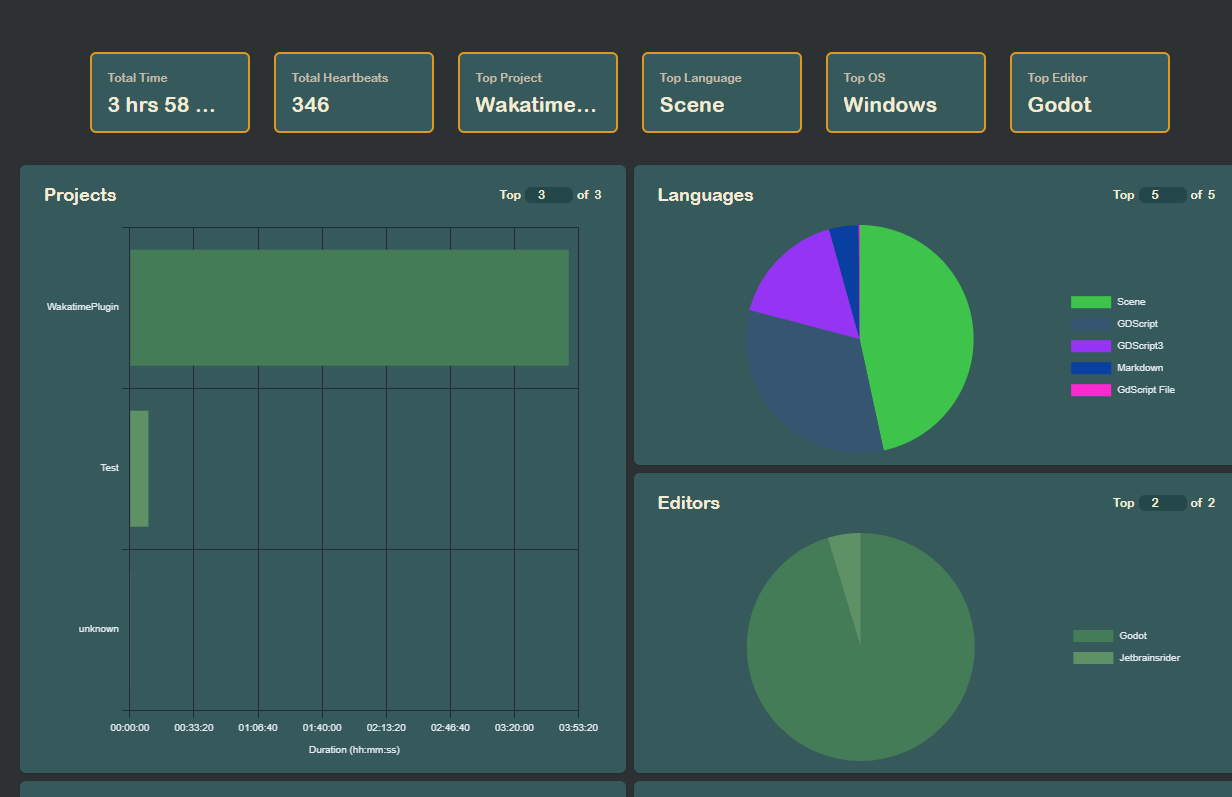
[![Product Screenshot][product-screenshot]](](https://waka.hackclub.com) This tool can successfully measure time spent building your games or apps in Godot. .
Here's why: * It differentiates between switching a scene and script * It counts key presses as coding and mouse clicks as building scene * Changing scene structure results in a heartbeat sent * It correctly detects OS, machine name, language, editor, files * It can detect your cursor line and position * Time is split between: Building, Coding, Testing * In the future it will also detect testing your projects It works on both Linux and Windows, it wasn't tested on macOS yet macOS yet
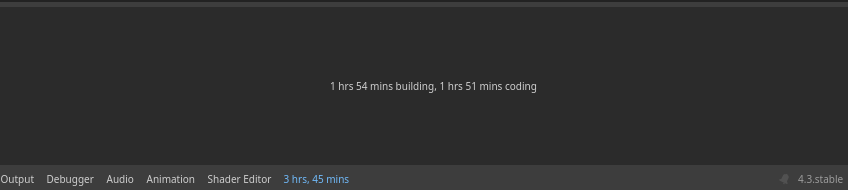
You can also see your time spent in the editor itself: [![Time in editor][time-screenshot]]
(top)
### Built Using I used the Ouch! CLI tool for decompression of files lesThis project was built using one simple, yet powerful language..
It required a lot of workarounds, but it was a pleasure to use it * [![GDScript][Godot]][Godot-url] * [![Ouch!][Ouch-shield]][Ouch-url] ]
(top)
## Getting Started How to install and use this software? It's easy! ### Installation You can either download it from the [Godot Asset Library](brary](https://godotengine.org/asset-library/asset/3484).Or you can manually install it, here's how to do it! 1. Clone the repository ```sh git clone ne https://github.com/BudzioT/Godot_Super-Wakatime.git ``` 2. Go into your project 3. Insert the entire `./addons` folder into your project `res://` directory y
(top)
## Usage Don't know how to use this plugin? Here are the steps: 1. Turn on the plugin in your plugins. In your `Project -> Project Settings -> Plugins -> `Click the `Enable` checkbox near this plugin 2. If prompted for API key, provide it from Wakatime website 3. if there is an issue with it, please manually create `~/.wakatime.cfg` file with these contents: ```sh [settings] api_key=xxxx ``` Where xxxx is your api key api key our api keyIf you are coming from Hack Club use this: ```sh [settings] api_url = l = https://hackatime.hackclub.com/api/hackatime/v1 api_key=xxxx ``` 4. Wakatime CLI should have been installed automatically along with Ouch! Decompression library 5. Work on your project! You should see your results on either Wakatime or Hackatime! 6. You can also see your time at the bottom panel nel
(top)
## License Distributed under the MIT License. See `LICENSE` for more information. on. [contributors-shield]: d]: https://img.shields.io/github/contributors/budziot/Godot_Super-Wakatime?style=for-the-badge [contributors-url]: https://github.com/BudzioT/Godot_Super-Wakatime/graphs/contributors [forks-shield]: https://img.shields.io/github/forks/budziot/Godot_Super-Wakatime?style=for-the-badge [forks-url]: https://github.com/BudzioT/Godot_Super-Wakatime/forks [stars-shield]: https://img.shields.io/github/stars/budziot/Godot_Super-Wakatime?style=for-the-badge [stars-url]: https://github.com/BudzioT/Godot_Super-Wakatime/stargazers [issues-shield]: https://img.shields.io/github/issues/budziot/Godot_Super-Wakatime?style=for-the-badge [issues-url]: https://github.com/BudzioT/Godot_Super-Wakatime/issues [license-shield]: https://img.shields.io/github/license/budziot/Godot_Super-Wakatime?style=for-the-badge [license-url]: https://github.com/BudzioT/Godot_Super-Wakatime/blob/master/addons/godot_super-wakatime/LICENSE [product-screenshot]: https://cloud-j4wibbzz7-hack-club-bot.vercel.app/0image.png [product-logo]: https://cloud-j4wibbzz7-hack-club-bot.vercel.app/2godotwaka2.png [Godot]: https://img.shields.io/badge/Godot%20Engine-478CBF?logo=godotengine&logoColor=fff&style=flatyle=flat [Godot-url]: https://godotengine.org/ [Ouch-shield]: https://img.shields.io/badge/Ouch!-tool-blue?label=Ouch! [Ouch-url]: https://github.com/ouch-org/ouch [time-screenshot]: https://cloud-l88kldf50-hack-club-bot.vercel.app/0image.png # DUCK