
A real-time tracking application for Milan's public transportation system, including metro, tram, and bus lines.
- Real-time tracking of vehicles on metro, tram, and bus lines using GTFS and ATM APIs
- Interactive map interface built with Leaflet.js and MarkerCluster for efficient visualization
- Clickable stop markers to display live wait times for all lines at each stop
- Vehicle position simulation based on real-time wait times, with animated movement along the route
- Support for all ATM (Azienda Trasporti Milanesi) lines, including Metro (M), Tram (T), and Bus (B) prefixes
- Color-coded lines and custom vehicle icons (with direction) for Metro, Tram, and Bus
- "Take me to vehicle" button to zoom to the nearest tracked vehicle
- Reset and clear map controls for user convenience
- Responsive design for desktop and mobile browsers
- Efficient backend caching and batch API requests to minimize load and rate limits
- Preprocessing and caching of GTFS data for fast startup and queries
- Robust error handling and fallback mechanisms for missing or incomplete data
- Supports live tracking of user-position on the map (if authorized)
- Animated vehicle markers that move smoothly along the polyline between stops, with direction-aware icons
- Highlighting of approaching stops with special markers
- Dynamic calculation of vehicle direction and bearing for icon orientation
- Vehicle speed calculated on speed limits and traffic conditions (provided by the Google Maps API)
- Polyline interpolation and segment-finding for accurate vehicle animation
- Wait time parsing and fallback logic for "in arrivo", "no serv.", and other custom ATM messages
- Batch fetching of wait times for all stops on a line to reduce API calls
- Support for both route_id and short_name lookups (although not recommended: "M5" and "5" both work)
- Customizable update interval for vehicle positions (default: 30 seconds)
- Modular Flask backend with endpoints for:
/track_line(route and stops for a line)/wait_time(wait times for a stop)/station_lines(lines serving a stop)/get_line_vehicle_data(all vehicles and stops for a line)/static/vehicle_images/...(custom vehicle icons)
- Python 3.x
- Flask
- Required Python packages (install via pip):
flask
requests
git clone https://github.com/Planetech0071/milanopt

cd Downloads/MilanoPTMake sure you have Python 3.7+ installed. Then run:
pip install -r requirements.txtEnsure the given_data/ directory contains all the following files:
agency.txtcalendar.txtcalendar_dates.txtfeed_info.txtroutes.txtshapes.txtstop_times.txtstops.txttransfers.txttrips.txt
Make sure the file stops_processed.csv exists in the project root.
The directory static/vehicle_images/ should contain subfolders for each vehicle type (BUS, METRO, TRAM, OTHER), each with direction images (U.png, D.png, L.png, R.png).
Start the Flask server:
python FINAL.pyThe server will start on http://localhost:8080.
Go to http://localhost:8080 to use the Milan Stops Map.
Notes:
- All the GTFS files combined take almost 1GB of space. Make sure you have enough space on your PC to download all of them!
- The first run may take a lot longer as it processes and caches GTFS data.
- If you update GTFS files, delete
gtfs_cache.jsonto force a refresh! - For any issues, check the console output for error messages.
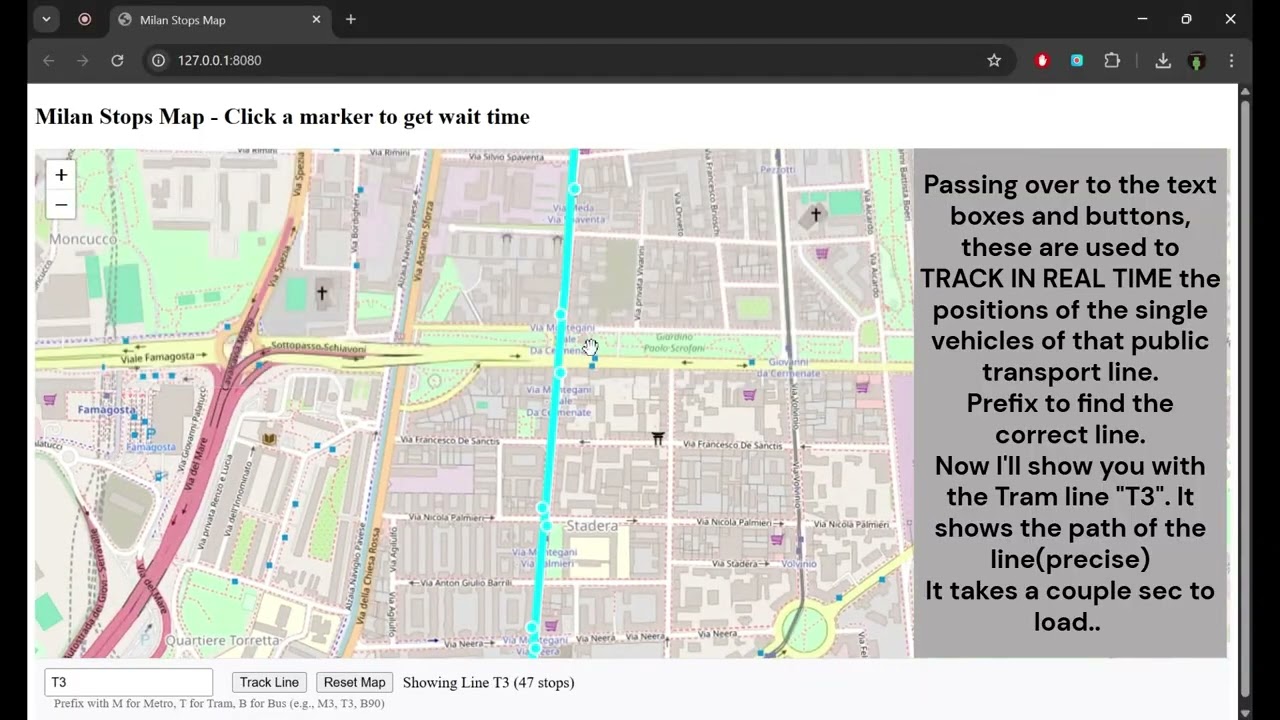
- Enter a line number in the input field (e.g., M1 for Metro 1, T3 for Tram 3, B90 for Bus 90)
- Click "Track Line" to view the line's route and vehicle positions
- Click on any stop marker to see wait times for all lines at that stop
- Use the "Take me to vehicle" button to zoom to the nearest vehicle
- Use the "Reset Map" button to clear the current tracking and return to the full map
- Vehicle markers are animated and direction-aware; highlighted stops indicate approaching vehicles
- The map and vehicle positions update automatically every 30 seconds (customizable)
Press below to watch the video
- GTFS data from ATM (Azienda Trasporti Milanesi)
- Real-time wait times for each station from ATM's API
This project is licensed under the MIT License - see the LICENSE file for details.